

As you know, the new Microsoft product installation usually includes a 30-days free trial license. However, the problem here is that the trial license is not uninstalled automatically when it is expired. And so this leads to the paradox that it keeps saying “Most features are disabled” or “Windows is not activated” even after activating it using a valid license. Besides, some of you guys who have ever used KMS license to activate your Windows or your Office and now you just want to remove it in order to use another product key. This is similar to the problem I just mentioned. And to address these issues, please do the following steps.
Steps to remove your Office license
Step 1: Open command prompt as administrator.
Step 2: Copy/run this command to determine what is the license key you want to remove.
cscript "%ProgramFiles%\Microsoft Office\Office16\ospp.vbs" /dstatusIf you see an error, try this command.
cscript "%ProgramFiles(x86)%\Microsoft Office\Office16\ospp.vbs" /dstatusNote: “Office16” is codename of Office 2016. If you are using Office 2010/2013/2016/2019 replace “Office16” with “Office14” or “Office15”.

Step 3: Copy and run these commands to remove the license. Note: replace “VMFTK” with the last 5 characters of your product key.
cscript "%ProgramFiles%\Microsoft Office\Office16\ospp.vbs" /unpkey:VMFTKIf you see an error, try this command.
cscript "%ProgramFiles(x86)%\Microsoft Office\Office16\ospp.vbs" /unpkey:VMFTKStep 1: Open command prompt with admin rights.
Step 2: Execute this command.
cscript slmgr.vbs /upk&cscript slmgr.vbs /cpky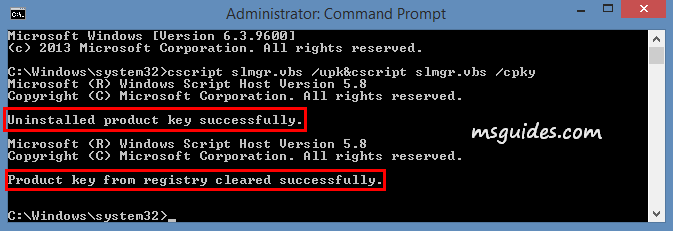
Done! The license you want to remove is uninstalled successfully.


